 Jordan Richter
Public Wi-Fi Security Tips for Small Business Travelers
Public Wi-Fi can expose small businesses to avoidable risk. Learn practical steps to protect employees, devices, and business data while traveling.
A project architect leaves a client site and realizes an hour later that the company iPad is missing. The device contains email, site photos, project notes, cloud application sessions, and access to active client files.
In this illustrative architecture-firm scenario, one missing device creates a string of questions: What data does it have? Was the screen locked? Can someone access the firm’s applications (or their proprietary data)? Who can disable it? Can it be disabled?
Mobile device management gives your IT team clearer answers and faster control. This article is about how it works, how it supports the NIST Cybersecurity Framework, and why it should connect to your broader managed IT program.
Mobile device management (MDM) is a system for enrolling, configuring, monitoring, and securing smartphones and tablets that access business resources.
NIST SP 800-124 Revision 2, published in May 2023, covers centralized management and endpoint protection for both company-owned and personally owned mobile devices. Its recommendations span deployment, everyday use and disposal. For a business, that means managing the device throughout its working life, rather than treating enrollment as a one-time setup task.
A modern MDM program can help your IT team:
These controls can cover Android phones and tablets, Apple iPhones and iPads, and supported laptops. Devices can also be grouped by role, allowing users in an organization to receive only the applications and access their role actually needs.
Bring your own device (BYOD) means employees use personally owned phones, tablets, or computers for work.
BYOD is common in office environments. An employee may check email from a personal phone, join a meeting from a tablet, or review a project document away from a company computer. A written policy should define which of those activities the business permits and what protections are required.
Properly configured MDM can keep work information in a managed area, separate from personal content. Depending on the device and enrollment method, a company may be able to remove its applications and data without deleting an employee’s personal photos, messages, or applications. NIST identifies this separation as an important privacy protection for BYOD programs.
Back to our architecture firm example: employees may use personal phones to photograph jobsite conditions, communicate with contractors, review drawings, or access cloud storage. A formal policy and managed work environment create a clear boundary around those activities.
Device ownership and enrollment determine what IT can control. For example, Apple’s device-erasure documentation states that remote Erase All Content and Settings is not available for accounts using User Enrollment. Do not promise a full-device wipe for every personal phone; document the controls supported by each platform and enrollment method.
This architecture firm has workflows across a number of devices: company laptops, shared tablets, company-owned phones, and personal mobile devices. Architects and project managers move between the office, client meetings, construction sites, hotels, and home. Their devices may connect to unfamiliar Wi-Fi networks and carry access to email, scheduling, file-sharing platforms, project management applications, client contacts, and site documentation.
Several routine situations can create business risk. An architect accidentally leaves a tablet in a site trailer. A project manager delays an operating system update. A departing employee still has company email on a personal phone. Someone downloads an unapproved file-sharing application because it is easier to use.
A useful device inventory answers two questions: which devices can access business data, and which of those devices meet the company’s security policy?
MDM applies consistent rules. Devices can receive approved applications, required configurations, and access restrictions during enrollment. IT can then monitor whether they remain compliant and take action when a device falls outside policy.
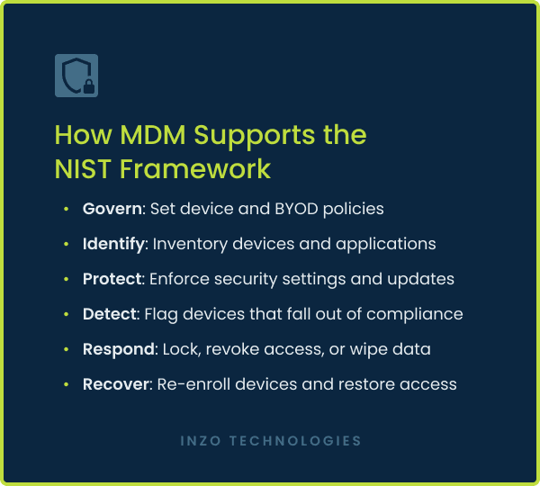
The NIST Cybersecurity Framework, or NIST CSF, gives organizations a common structure for managing cybersecurity risk. Version 2.0 organizes cybersecurity outcomes around six functions: Govern, Identify, Protect, Detect, Respond, and Recover.
Leadership establishes policies for company-owned devices, BYOD participation, approved applications, employee privacy, acceptable use, and offboarding.
For this architecture firm, this may include a rule that employees can access project files from personal phones only after enrolling the device in the firm’s MDM program.
The firm maintains an inventory of enrolled devices, operating system versions, installed applications, ownership, assigned users, and compliance status.
This answers a basic question many small businesses struggle with: Which mobile devices can currently access our data?
MDM applies safeguards such as encryption, passcodes, device restrictions, approved applications, and operating system update requirements.
A newly issued tablet can automatically receive the firm’s email application, project management tools, Wi-Fi settings, and security rules when the employee first turns it on. Automated enrollment reduces manual setup and makes configurations more consistent.
Monitoring identifies devices that fall out of compliance. IT may receive an alert when a device misses an update, disables a required setting, or stops meeting policy.
That visibility allows the business to address the problem before the device becomes a weak point.
If a phone or tablet goes missing, IT should revoke business access and use the lock or wipe actions supported by its platform and enrollment method. Record the action’s status; requesting a remote action is not evidence that it completed. A response plan should identify who checks the result and handles any remaining exposure.
These actions give the business a defined response instead of relying on the employee to change passwords and hope the device remains inaccessible.
MDM helps restore access by replacing or re-enrolling the affected device and reapplying the correct applications and policies.
Broader recovery requires additional services. Backups for supported cloud applications, workstations, and servers help restore the data and systems employees need after ransomware, hardware failure, accidental deletion, or another incident.
In this example, Monday’s new company tablet receives its approved applications and policies through automated enrollment. On Tuesday, an employee enrolls a personal iPhone under the firm’s BYOD policy. On Wednesday, support helps a field employee resolve an application issue.
On Thursday, a device is reported missing. IT revokes business access, requests the supported lock or data-removal actions, and checks their status. On Friday, an employee leaves; IT removes business access and uses the supported method to remove managed company data. The available actions depend on the device, enrollment method and management platform.
Good device management makes these situations routine. The business can follow the same documented process every time instead of asking leadership, office management, or employees to improvise.
MDM requires ongoing administration. Someone must enroll devices, maintain policies, test updates, monitor compliance, support users, remove access, and document changes.
Small and medium-sized businesses may have an employee or two who can handle parts of that workload. But maintaining the process becomes difficult when that person also manages vendors, software issues, account requests, security alerts, and day-to-day support.
Outsourced managed IT gives the organization a larger technical bench and connects mobile devices to the rest of the environment. MDM covers phones and tablets. Remote monitoring and management (RMM) maintains supported workstations and servers. Backup services protect supported cloud, workstation, and server data.
Help desk support, patching, account administration, security monitoring, vendor coordination, and recovery planning complete the operating model. Shared standards across these services reduce tool fragmentation and give the business a clearer view of its technology environment.
Start by asking whether your company can answer these questions:
Even a few uncertain answers usually indicate that mobile access has outgrown informal management.
We include MDM within a broader managed IT and cybersecurity program designed for growing organizations with lean internal teams. If you are unsure how well your phones and tablets are controlled, let’s have a 15-minute conversation. We can look at how mobile access fits into your current environment and determine whether there are gaps worth addressing. No hard sell or obligation.